Flows

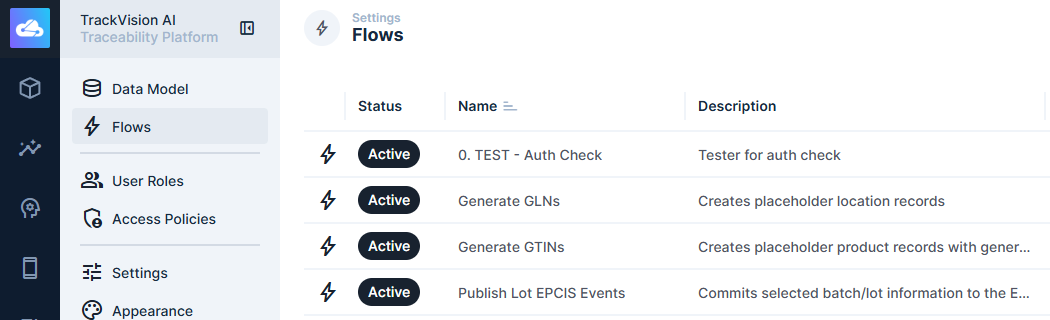
Flows in TrackVision AI are visual workflow automation tools that enable you to create sophisticated business processes by connecting operations, transformations, and integrations. They provide a drag-and-drop interface for building complex data processing pipelines and business logic automation.

Overview

Flows allow you to automate repetitive tasks, process data transformations, integrate with external systems, and implement complex business rules without writing code. Each flow consists of interconnected operations that execute in sequence or parallel based on your configuration.

Key capabilities:

  • Visual workflow designer with drag-and-drop operations
  • Real-time and scheduled execution modes
  • Data transformation and validation operations
  • External system integrations (APIs, webhooks, databases)
  • Conditional logic and branching
  • Error handling and retry mechanisms
  • Monitoring and logging for debugging

Flow Components

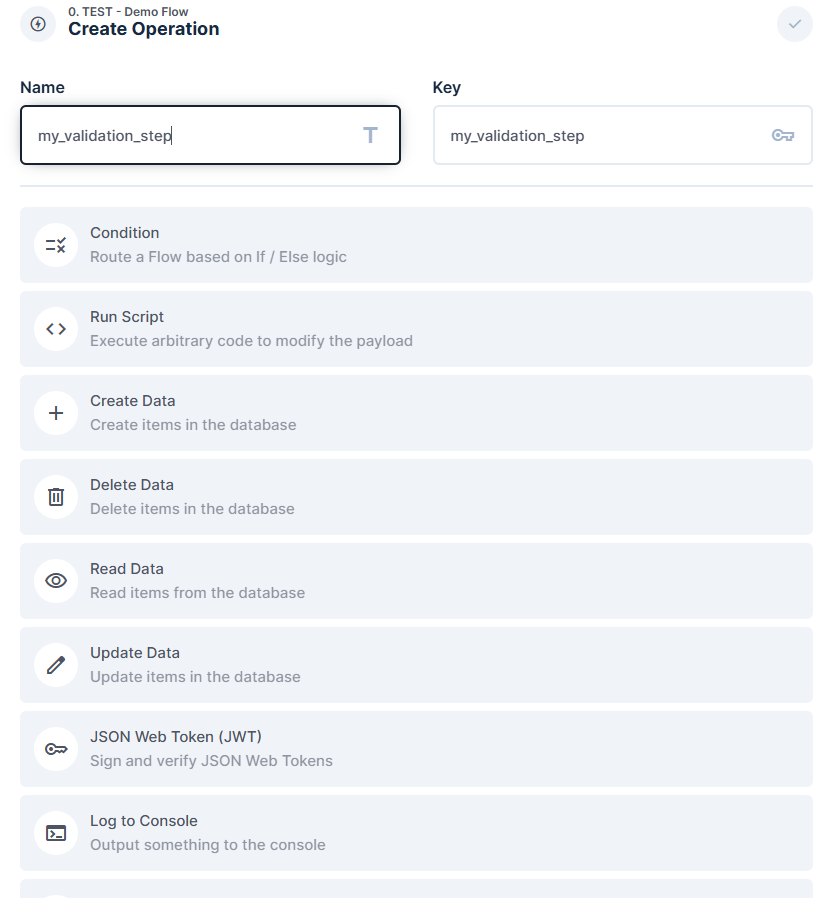
Operations

Operations are the building blocks of flows, each performing a specific task or transformation.

Data Operations

  • Read: Retrieve data from collections or external sources
  • Create: Insert new records into collections
  • Update: Modify existing records
  • Delete: Remove records from collections
  • Transform: Apply data transformations and mappings
  • Validate: Check data quality and business rules

Logic Operations

  • Condition: Branch flow execution based on criteria
  • Loop: Iterate over datasets or repeat operations
  • Parallel: Execute multiple operations simultaneously
  • Merge: Combine results from multiple operations
  • Delay: Introduce time delays in flow execution
  • Stop: Halt flow execution based on conditions

Integration Operations

  • HTTP Request: Make API calls to external services
  • Webhook: Trigger external webhooks with data
  • Database Query: Execute custom SQL queries
  • File Operations: Read, write, and process files
  • Email: Send automated email notifications
  • SMS: Send text message notifications

Utility Operations

  • Log: Write debug information and audit trails
  • Script: Execute custom JavaScript code
  • Generate: Create synthetic data or unique identifiers
  • Aggregate: Perform calculations on datasets
  • Filter: Select subsets of data based on criteria
  • Sort: Order data by specified fields

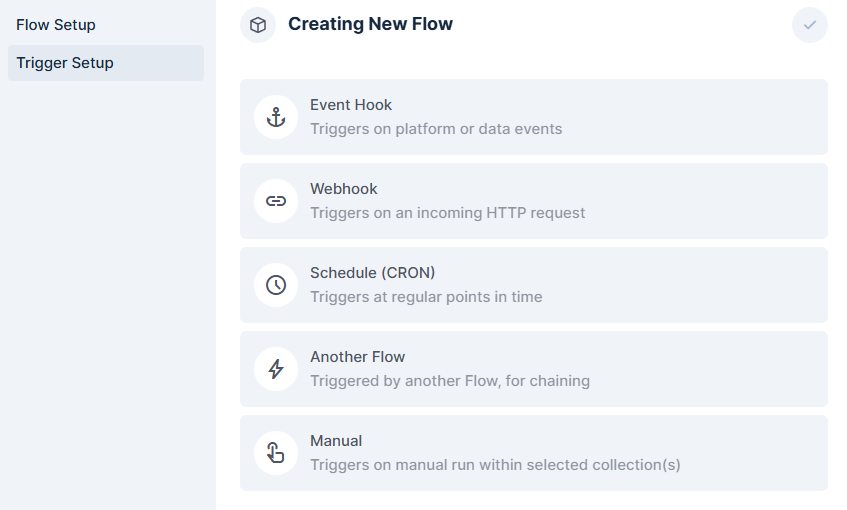
Triggers

Triggers define when and how flows are executed.

Event Triggers

  • Collection Events: React to data changes (create, update, delete)
  • Field Events: Respond to specific field modifications
  • User Events: Trigger on user actions or authentication
  • System Events: React to system state changes

Schedule Triggers

  • Cron Schedule: Execute flows at specific times or intervals
  • Interval: Run flows at regular time intervals
  • One-time: Schedule single execution at future time
  • Business Hours: Restrict execution to working hours

Manual Triggers

  • Button: Execute flows through user interface buttons
  • API Endpoint: Trigger flows via REST API calls
  • Webhook: Start flows from external webhook calls
  • Admin Panel: Manual execution from administration interface

Variables and Context

Flows maintain context and variables throughout execution.

Flow Variables

  • Input Variables: Data passed to flow at execution time
  • Global Variables: Shared across all operations in flow
  • Operation Variables: Local to specific operations
  • Environment Variables: System-wide configuration values

Context Data

  • Trigger Context: Information about what initiated the flow
  • User Context: Current user and permission information
  • Collection Context: Related collection and record data
  • System Context: Platform state and configuration

Flow Types

Real-time Flows

Real-time flows execute immediately when triggered by events.

Characteristics:

  • Low latency execution (typically < 1 second)
  • Event-driven activation
  • Ideal for user-facing automations
  • Limited execution time (30 seconds max)

Use cases:

  • Data validation on record creation
  • Automatic field calculations
  • Real-time notifications
  • API response enrichment
  • User permission checks

Example Configuration:

{
"name": "Product Price Calculator",
"type": "realtime",
"trigger": {
"type": "collection_event",
"collection": "products",
"events": ["create", "update"],
"fields": ["cost", "markup_percentage"]
},
"operations": [
{
"type": "calculate",
"formula": "cost * (1 + markup_percentage / 100)",
"output_field": "price"
},
{
"type": "update",
"collection": "products",
"data": {
"price": "{{ previous.result }}"
}
}
]
}

Batch Flows

Batch flows process large datasets or perform time-intensive operations.

Characteristics:

  • Higher latency execution (minutes to hours)
  • Scheduled or manual activation
  • Can process large volumes of data
  • Extended execution time limits

Use cases:

  • Data synchronization with external systems
  • Bulk data transformations
  • Report generation
  • Cleanup and maintenance tasks
  • ETL (Extract, Transform, Load) processes

Example Configuration:

{
"name": "Daily Sales Report",
"type": "batch",
"trigger": {
"type": "schedule",
"cron": "0 9 * * 1-5"
},
"operations": [
{
"type": "read",
"collection": "orders",
"filter": {
"created_at": {
"_gte": "{{ yesterday }}"
}
}
},
{
"type": "aggregate",
"functions": ["sum", "count", "avg"],
"fields": ["total_amount"]
},
{
"type": "email",
"to": "sales@company.com",
"template": "daily_sales_report",
"data": "{{ previous.result }}"
}
]
}

Integration Flows

Integration flows connect TrackVision AI with external systems and services.

Characteristics:

  • Focus on data exchange and synchronization
  • Error handling for external service failures
  • Retry mechanisms for failed operations
  • Support for various data formats and protocols

Use cases:

  • CRM synchronization
  • E-commerce platform integration
  • Financial system data exchange
  • Third-party API data enrichment
  • Webhook processing from external systems

Flow Designer

Visual Interface

The flow designer provides a visual canvas for creating and editing flows.

Canvas Features

  • Drag-and-drop Operations: Add operations from operation library
  • Connection Lines: Visual representation of data flow
  • Operation Configuration: In-place editing of operation settings
  • Zoom and Pan: Navigate large complex flows
  • Grid Snap: Align operations for clean layouts

Operation Library

  • Categorized Operations: Organized by function (data, logic, integration)
  • Search and Filter: Quickly find specific operations
  • Custom Operations: User-defined reusable operations
  • Documentation: Built-in help for each operation type

Configuration Panels

Each operation has detailed configuration options.

Common Settings

  • Name and Description: Human-readable operation labels
  • Input Mapping: Define how data flows into operation
  • Output Mapping: Configure operation result structure
  • Error Handling: Specify behavior on operation failure
  • Conditions: Control when operation executes

Advanced Settings

  • Timeout: Maximum execution time for operation
  • Retry Policy: Automatic retry configuration
  • Caching: Cache operation results for performance
  • Monitoring: Enable detailed logging and metrics
  • Dependencies: Specify operation execution order

Testing and Debugging

The flow designer includes comprehensive testing capabilities.

Test Execution

  • Step-by-step Debugging: Execute flows one operation at a time
  • Breakpoints: Pause execution at specific operations
  • Variable Inspection: View operation inputs and outputs
  • Mock Data: Test flows with sample data
  • Performance Profiling: Identify slow operations

Error Analysis

  • Error Visualization: Highlight failed operations
  • Stack Traces: Detailed error information
  • Retry History: View previous execution attempts
  • Log Integration: Access detailed execution logs
  • Alert Configuration: Set up failure notifications

Data Flow and Transformations

Data Mapping

Operations can transform data structure and format as it flows through the pipeline.

Field Mapping

{
"type": "transform",
"mapping": {
"customer_name": "{{ input.first_name }} {{ input.last_name }}",
"total_value": "{{ input.quantity * input.unit_price }}",
"order_date": "{{ input.created_at | date_format('Y-m-d') }}"
}
}

Data Type Conversions

  • String to Number: Parse numeric strings
  • Date Formatting: Convert between date formats
  • JSON Processing: Parse and generate JSON structures
  • Array Operations: Filter, map, and reduce arrays
  • Object Manipulation: Merge, split, and restructure objects

Conditional Logic

Flows support complex conditional branching based on data values.

Simple Conditions

{
"type": "condition",
"expression": "{{ input.amount > 1000 }}",
"true_path": [
{
"type": "email",
"to": "manager@company.com",
"subject": "High-value order notification"
}
],
"false_path": [
{
"type": "log",
"message": "Standard order processed"
}
]
}

Complex Logic

  • Multiple Conditions: AND, OR, NOT operators
  • Pattern Matching: Regular expressions and wildcards
  • Data Validation: Check data quality and completeness
  • Business Rules: Implement complex business logic
  • Dynamic Routing: Route data based on content

Loops and Iteration

Process collections of data with loop operations.

For Each Loop

{
"type": "loop",
"mode": "for_each",
"input": "{{ input.order_items }}",
"operations": [
{
"type": "update",
"collection": "inventory",
"filter": {
"product_id": "{{ loop.item.product_id }}"
},
"data": {
"quantity": "{{ current.quantity - loop.item.quantity }}"
}
}
]
}

While Loop

{
"type": "loop",
"mode": "while",
"condition": "{{ loop.index < 10 && api_has_more_data }}",
"operations": [
{
"type": "http_request",
"url": "https://api.example.com/data?page={{ loop.index }}",
"method": "GET"
}
]
}

Integration Capabilities

API Integrations

Flows can interact with external APIs for data exchange and synchronization.

REST API Calls

{
"type": "http_request",
"url": "https://api.crm.com/contacts",
"method": "POST",
"headers": {
"Authorization": "Bearer {{ env.CRM_API_TOKEN }}",
"Content-Type": "application/json"
},
"body": {
"name": "{{ input.customer_name }}",
"email": "{{ input.email }}",
"phone": "{{ input.phone }}"
},
"timeout": 30,
"retry": {
"attempts": 3,
"delay": 5
}
}

GraphQL Queries

{
"type": "graphql_request",
"endpoint": "https://api.example.com/graphql",
"query": "query GetUser($id: ID!) { user(id: $id) { name email orders { total } } }",
"variables": {
"id": "{{ input.user_id }}"
}
}

Database Connections

Connect to external databases for data synchronization.

SQL Databases

{
"type": "database_query",
"connection": "external_db",
"query": "SELECT * FROM customers WHERE last_updated > ?",
"parameters": ["{{ flow.last_sync_time }}"],
"timeout": 60
}

NoSQL Databases

{
"type": "mongodb_operation",
"connection": "mongo_db",
"collection": "products",
"operation": "find",
"filter": {
"category": "{{ input.category }}",
"active": true
}
}

File Processing

Handle file uploads, downloads, and transformations.

File Operations

{
"type": "file_operation",
"action": "read",
"path": "/uploads/{{ input.filename }}",
"format": "csv",
"options": {
"delimiter": ",",
"headers": true,
"encoding": "utf-8"
}
}

Data Export

{
"type": "file_export",
"format": "xlsx",
"data": "{{ input.report_data }}",
"filename": "sales_report_{{ now | date_format('Y-m-d') }}.xlsx",
"destination": "/reports/"
}

Monitoring and Analytics

Execution Monitoring

Track flow performance and execution statistics.

Metrics Collected

  • Execution Count: Number of flow runs
  • Success Rate: Percentage of successful executions
  • Average Duration: Mean execution time
  • Error Rate: Frequency of failures
  • Data Volume: Amount of data processed

Performance Dashboards

  • Real-time Monitoring: Live execution status
  • Historical Trends: Performance over time
  • Resource Usage: CPU, memory, and I/O consumption
  • Bottleneck Identification: Slow operations and dependencies
  • Capacity Planning: Scaling recommendations

Logging and Auditing

Comprehensive logging for debugging and compliance.

Log Levels

  • Debug: Detailed operation information
  • Info: General execution information
  • Warning: Potential issues and recoverable errors
  • Error: Operation failures and exceptions
  • Critical: System-level failures

Audit Trails

  • User Actions: Who created, modified, or executed flows
  • Data Changes: What data was modified by flows
  • System Events: Platform state changes
  • Access Logs: Who accessed which flows when
  • Compliance Reports: Audit reports for regulatory requirements

Alerting and Notifications

Set up notifications for flow events and issues.

Alert Types

  • Execution Failures: Notify when flows fail
  • Performance Degradation: Alert on slow execution
  • Data Quality Issues: Warn about invalid data
  • System Resource Limits: Notify on resource constraints
  • Custom Conditions: User-defined alert criteria

Notification Channels

  • Email: Send alert emails to administrators
  • SMS: Text message notifications for critical issues
  • Webhooks: Trigger external monitoring systems
  • Slack Integration: Post alerts to team channels
  • Dashboard Alerts: Visual notifications in admin interface

Best Practices

Flow Design

Modularity and Reusability

  1. Single Responsibility: Each flow should have one clear purpose
  2. Reusable Operations: Create custom operations for common tasks
  3. Flow Composition: Combine simple flows to build complex processes
  4. Parameter Configuration: Use variables for configurable values
  5. Documentation: Include clear descriptions and comments

Error Handling

  1. Graceful Degradation: Handle failures without breaking entire flow
  2. Retry Strategies: Implement appropriate retry logic for transient failures
  3. Fallback Operations: Provide alternative paths for critical failures
  4. Error Logging: Capture detailed error information for debugging
  5. User Notifications: Inform users of important failures

Performance Optimization

Execution Efficiency

  1. Parallel Processing: Execute independent operations in parallel
  2. Data Filtering: Process only necessary data
  3. Caching Strategy: Cache frequently accessed data
  4. Resource Management: Monitor and optimize resource usage
  5. Batch Processing: Group similar operations for efficiency

Scalability Considerations

  1. Load Testing: Test flows with realistic data volumes
  2. Resource Limits: Set appropriate timeouts and memory limits
  3. Queue Management: Handle high-volume trigger events
  4. Database Optimization: Optimize queries and indexes
  5. External API Limits: Respect rate limits and quotas

Security and Compliance

Data Protection

  1. Access Controls: Implement proper user permissions
  2. Data Encryption: Encrypt sensitive data in transit and at rest
  3. Input Validation: Validate all external data inputs
  4. Output Sanitization: Clean data before sending to external systems
  5. Audit Logging: Maintain comprehensive audit trails

Integration Security

  1. API Authentication: Use secure authentication methods
  2. Token Management: Rotate and secure API tokens
  3. Network Security: Use VPNs and secure connections
  4. Data Minimization: Only process necessary data
  5. Compliance Requirements: Follow relevant data protection regulations

Maintenance and Evolution

Version Control

  1. Flow Versioning: Maintain versions of flow configurations
  2. Change Management: Document and approve flow changes
  3. Rollback Procedures: Plan for reverting problematic changes
  4. Testing Procedures: Test flows in development environments
  5. Release Management: Coordinate flow deployments

Monitoring and Optimization

  1. Performance Monitoring: Regularly review flow performance
  2. Usage Analytics: Track which flows are most valuable
  3. Error Analysis: Identify and fix common failure patterns
  4. Resource Optimization: Optimize resource usage over time
  5. Business Value Assessment: Measure ROI of automation flows