Modifying the Data Model
TrackVision's data model is fully configurable. You can add custom fields to any existing entity, create entirely new collections to capture data your business needs, and define relationships between them. Changes made here are reflected immediately across the platform — in forms, list views, filters, and the API.
TrackVision will configure the data model on your behalf during onboarding. This section is relevant if you need to extend the model yourself, or if you want to understand how it is done.
Data model configuration is at Settings > Data Model.
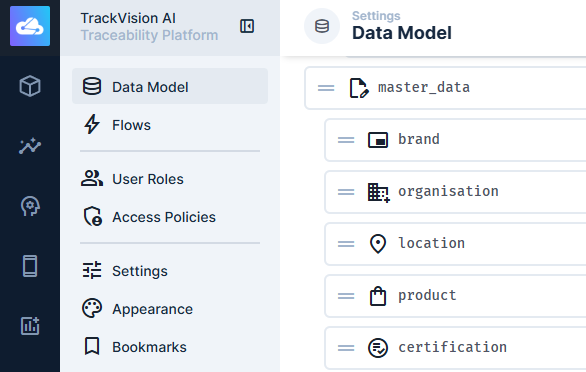
Collections
A collection is a table in the database. TrackVision's core entities — products, locations, organisations, EPCIS events, lots, and so on — are all collections. You can extend these with additional fields or create new collections from scratch.
Creating a Collection
- Go to Settings > Data Model and click Create Collection.
- Set the collection name. This becomes the database table name and cannot be changed after creation. Use lowercase with underscores (e.g.
quality_tests). - Configure the primary key type: auto-increment integer, UUID (recommended for most cases), or manually-entered string.
- Add fields (see below).
Collection Settings
Singleton — when enabled, the collection holds exactly one item (e.g. a configuration record). The UI bypasses the list view and goes directly to the item.
Sorting — designate an integer field as the sort field to enable manual drag-and-drop ordering of items in the UI and API.
Archive — configure a field and value that marks items as archived. Archived items remain in the database but are hidden from default views. Useful for soft-deletion patterns.
Fields
Fields are the columns of a collection. Each field has a type (how data is stored) and an interface (how it is presented in the editor UI).
Field Types
| Category | Types |
|---|---|
| Text | String, Text, UUID, Hash |
| Numeric | Integer, Big Integer, Float, Decimal |
| Boolean | Boolean |
| Date & Time | DateTime, Date, Time, Timestamp |
| Structured | JSON, CSV |
| Geospatial | Point, LineString, Polygon, and multi variants |
| Other | Binary, Alias (virtual — no database column) |
Interfaces
The interface controls how a field appears to editors. The same underlying field type can use different interfaces depending on context — for example, a String field might use a plain text input, a dropdown with fixed choices, a colour picker, or an autocomplete that queries another collection.
Common interfaces include:
- Input — plain text or number entry
- Textarea / WYSIWYG — long-form text with or without rich formatting
- Dropdown / Radio / Checkboxes — selection from a fixed list of options
- Toggle — boolean on/off switch
- DateTime Picker — date and/or time selector
- Map — geospatial point or polygon entry
- File / Image — file upload linked to the file library
- Repeater — structured list of sub-items stored as JSON
- Builder (M2A) — flexible block-style content from multiple collections
Display Options
Display options control how a field value appears in list views and relation fields throughout the UI — separate from how it appears in the editor. You can display raw values, apply formatting, or use conditional styling (different colours, icons, or labels based on the value).
Validation
Field-level validation rules are evaluated when an item is created or updated. If validation fails, you can show a custom error message to the editor. Validation is applied at the application layer — not enforced at the database level.
Relationships
Relationships link records across collections. TrackVision supports four relationship types.
Many to One (M2O)
Multiple items in one collection relate to a single item in another. This is the most common relationship type — implemented as a foreign key column on the source collection.
Example: many lot records belong to one product (GTIN).
In the editor, M2O fields typically appear as a dropdown or search input that selects a related record.
One to Many (O2M)
The inverse of M2O — seen from the other side. No new database column is created; an O2M field is a virtual Alias field that displays the related items from the foreign collection.
Example: a product record shows all lots that reference it.
Many to Many (M2M)
Items in two collections can be linked to any number of items in each other. Implemented via a junction collection that stores pairs of primary keys. The junction collection can itself have additional fields (e.g. a "quantity" on an order–product relationship).
Example: a shipment can include many products, and a product can appear in many shipments.
Many to Any (M2A)
One collection can be related to items from multiple different collections. The junction table stores both the related item's primary key and its collection name. Useful for flexible content structures where the type of related content is not fixed.
Example: a document record that can attach to either a lot, a location, or an organisation.
Translations
A built-in relationship pattern that creates a translations table and a languages collection alongside an O2M alias field. Used to store field values in multiple languages against the same record.
Extending Existing Collections
You can add fields to any of TrackVision's built-in collections — products, locations, organisations, lots, EPCIS events, certifications, etc. Added fields appear in the editor UI alongside the built-in fields, are filterable in list views, and are returned by the API.
Common extensions:
- Products — industry-specific attributes (nutritional data, technical specs, regulatory classifications), custom certification fields, sustainability metrics
- Locations — facility type, capacity, compliance status, accreditation dates
- Organisations — industry classification, custom contact roles, performance KPIs
- Lots — quality test results, process parameters, additional traceability metadata
- EPCIS events — custom business context fields not covered by the standard event schema
Related Documentation
- Permissions — controlling which roles can read or write custom collections and fields
- System API - Collections — API reference for collection metadata