User Management
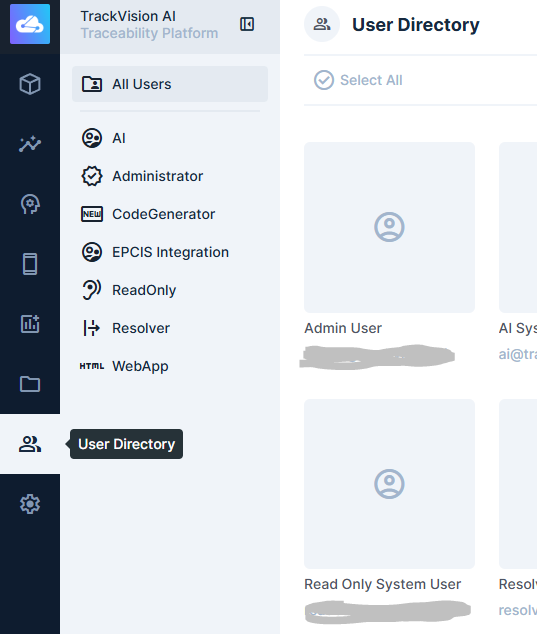
User management is accessible by clicking on the User Directory icon in far left navigation menu. Administrators can invite, create, edit, and deactivate user accounts from here:
Inviting Users
The recommended way to add a new user is by invitation:
- Navigate to User Directory and click the Invite Users button on the top right of the frame
- Enter the user's email address and select the role they should be assigned.
- Click Invite. The user receives an email with a link to set their password and activate their account.
Pending invitations are listed in the Users table with a status of Invited. You can resend or cancel a pending invitation at any time.
Creating Users Directly
Administrators can also create accounts without sending an invitation:
- Navigate to User Directory and click Create User.
- Fill in the user's email address, name, and assign a role.
- Set a temporary password. The user should change it on first login.
Editing a User
Click any user in the list to open their profile. From here you can:
- Update their name, email, and contact details
- Change their role assignment
- Reset their password
- View and terminate their active sessions
Deactivating a User
To remove access without deleting the account, set the user's Status to Suspended. This immediately blocks login while preserving the user's data and audit history.
To permanently delete a user, open their profile and select Delete User. This is irreversible — suspending is usually preferable if account history may be needed.
Roles and Permissions
Every user is assigned a role, which determines what data they can read or write and what parts of the platform they can access. Roles are configured separately — see Permissions for details.
If a user needs different access temporarily, change their role assignment rather than modifying the role itself (which would affect all users in that role).
Password Resets
Administrators can trigger a password reset from any user's profile page — the user receives an email with a reset link. Users can also reset their own password from the login screen if they have access to their registered email.
Related Documentation
- Permissions — role configuration and access control
- System API - Users — API reference for programmatic user management